Native SDK
Before You Begin
To integrate the Bidease SDK, you need an active publisher account on the Bidease Monetize platform. If you don't have one yet, please reach out to your Bidease account manager.
Prerequisites:
- Minimum Android SDK:
23(Android 6.0) - Target API:
35
1. Installation
Current published version: 3.0.1.
dependencies {
  implementation("com.bidease:bidease-mobile:3.0.1")
}
Always use the latest available SDK version from Bidease.
2. Initialization
2.1. Getting your App Key
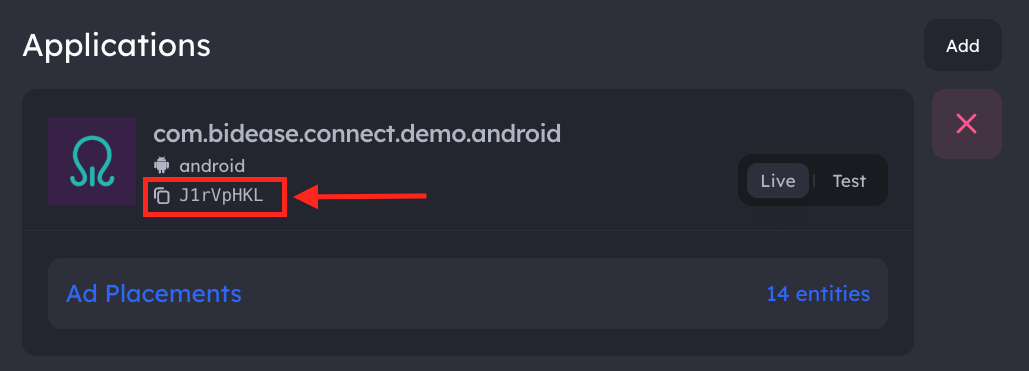
Your App Key is available in the Bidease Monetize dashboard:
- Log in to your account at monetize.bidease.com
- Go to Applications
- Open the required application
- Copy the App Key
2.2. SDK Initialization
Use the App Key from the step above to initialize the SDK. Call BideaseMobile.initialize() as early as possible in your app lifecycle — ideally in your Application.onCreate() or main Activity.onCreate(). Ad requests made before initialization completes will not be served.
import com.bidease.mobile.BideaseMobile
import com.bidease.mobile.InitFailure
import com.bidease.mobile.InitParams
import com.bidease.mobile.InitSuccess
import com.bidease.mobile.PrivacyParams

val result = BideaseMobile.initialize(
  applicationContext,
  InitParams(
      key = "YOUR_APP_KEY",
      privacyParams = PrivacyParams(/* see Privacy & Consent */),
      customProps = mapOf("ipv4" to "203.0.113.17")
  )
)
when (result) {
  is InitSuccess -> { /* SDK is ready */ }
  is InitFailure -> { /* Handle error: result.error */ }
}
privacyParams and customProps are optional. See Privacy & Consent for the full list of privacy fields.
YOUR_APP_KEY with the App Key from your Bidease Monetize dashboard.3. Ad Formats
Before loading ads, create the corresponding placements in the Bidease Monetize dashboard. The placementName in your code must match the placement name configured in the UI.
The SDK supports two integration flows — Mediation, where a single load(...) call runs the auction and renders the ad, and the Bidding API, where you request a bid first, compare its price against other demand, and render only if Bidease wins.
3.1. Banner
Supported sizes:
| Constant | Size | Description |
|---|---|---|
AdSize.BANNER_320x50 | 320×50 | Standard banner |
AdSize.BANNER_300x250 | 300×250 | Medium rectangle (mrec) |
import com.bidease.mobile.LoadParams
import com.bidease.mobile.ads.AdSize
import com.bidease.mobile.bannerads.BannerLoadFailure
import com.bidease.mobile.bannerads.BannerLoadSuccess
import com.bidease.mobile.bannerads.BannerView

val bannerView = BannerView(context)
container.removeAllViews()
container.addView(bannerView, ViewGroup.LayoutParams(
    ViewGroup.LayoutParams.MATCH_PARENT,
    ViewGroup.LayoutParams.WRAP_CONTENT
))

bannerView.onLoaded = { println("Banner loaded") }
bannerView.onDisplayed = { println("Banner displayed") }
bannerView.onClicked = { println("Banner clicked") }
bannerView.onClosed = { println("Banner closed") }
bannerView.onFailed = { error -> println("Banner failed: $error") }

val result = bannerView.load(AdSize.BANNER_320x50, LoadParams(placementName = "banner_main"))
when (result) {
    is BannerLoadSuccess -> println("Banner loaded: ${result.responseData}")
    is BannerLoadFailure -> println("Banner failed: ${result.error}")
}
3.2. Interstitial
import com.bidease.mobile.LoadParams
import com.bidease.mobile.interstitialads.InterstitialAd
import com.bidease.mobile.interstitialads.InterstitialLoadFailure
import com.bidease.mobile.interstitialads.InterstitialLoadSuccess

val interstitialAd = InterstitialAd(applicationContext)

interstitialAd.onLoaded = { println("Loaded") }
interstitialAd.onDisplayed = { println("Displayed") }
interstitialAd.onClicked = { println("Clicked") }
interstitialAd.onClosed = { println("Closed") }
interstitialAd.onFailed = { error -> println("Failed: $error") }

val result = interstitialAd.load(LoadParams(placementName = "interstitial_main"))
when (result) {
    is InterstitialLoadSuccess -> println("Loaded: ${result.responseData}")
    is InterstitialLoadFailure -> println("Failed: ${result.error}")
}

interstitialAd.show()
3.3. Rewarded
Rewarded ads extend interstitial with an onRewarded callback that fires when the user completes the ad.
import com.bidease.mobile.LoadParams
import com.bidease.mobile.interstitialads.InterstitialLoadFailure
import com.bidease.mobile.interstitialads.InterstitialLoadSuccess
import com.bidease.mobile.rewardedads.RewardedAd

val rewardedAd = RewardedAd(applicationContext)

rewardedAd.onRewarded = { println("User earned reward!") }
rewardedAd.onLoaded = { println("Loaded") }
rewardedAd.onDisplayed = { println("Displayed") }
rewardedAd.onClicked = { println("Clicked") }
rewardedAd.onClosed = { println("Closed") }
rewardedAd.onFailed = { error -> println("Failed: $error") }

val result = rewardedAd.load(LoadParams(placementName = "rewarded_main"))
when (result) {
    is InterstitialLoadSuccess -> println("Loaded: ${result.responseData}")
    is InterstitialLoadFailure -> println("Failed: ${result.error}")
}

rewardedAd.show()
4. Privacy & Consent
Privacy signals and custom props are passed to the Bidease SDK via InitParams at initialization. Set them when you initialize the SDK, or update them at runtime via BideaseMobile.setPrivacyParams(...) / setCustomProps(...).
Not for child-directed traffic. Bidease does not purchase or monetize traffic from applications directed to children or to individuals under the age of 13. Publishers are solely responsible for identifying child-directed inventory under COPPA and other applicable laws and must not integrate the Bidease SDK into, or send any traffic or personal data from, such inventory.
import com.bidease.mobile.PrivacyParams

val privacyParams = PrivacyParams(
    coppaEnabled = false,
    subjectToGdpr = true,
    subjectToCoppa = false,
    usPrivacyString = "1YNN",
    gppString = "DBACNYA~CPXxRfAPXxRfAAfKABENB-CgAAAAAAAAAAYgAAAAAAAA~1YNN",
    gppSid = listOf(2, 6),
    userConsentString = "CPXxRfAPXxRfAAfKABENB-CgAAAAAAAAAAYgAAAAAAAA",
    subjectToLgpd = true
)
| Field | Type | Description |
|---|---|---|
coppaEnabled | Boolean? | Enable COPPA compliance |
subjectToGdpr | Boolean? | Subject to GDPR |
subjectToCoppa | Boolean? | Subject to COPPA |
usPrivacyString | String? | IAB US Privacy string (e.g. "1YNN") |
gppString | String? | IAB GPP consent string |
gppSid | List<Int>? | GPP section IDs |
userConsentString | String? | IAB TCF consent string |
subjectToLgpd | Boolean? | Subject to Brazilian LGPD |
4.2. Updating at runtime
import com.bidease.mobile.BideaseMobile

BideaseMobile.setPrivacyParams(privacyParams)
BideaseMobile.setCustomProps(mapOf("ipv4" to "203.0.113.17"))
Runtime setters are no-ops before BideaseMobile.initialize(...) completes. Pass an initial value via InitParams and use the setters only for later updates.
5. Test Mode
Option 1: Enable via Code
Pass testMode = true in LoadParams:
val result = interstitialAd.load(LoadParams(placementName = "test", testMode = true))

val result = interstitialAd.load(LoadParams(testMode = true))
Option 2: Enable via Dashboard
- Go to Applications and open the required app
- Navigate to Test Devices and add the devices you want to test on — use GAID (Android Advertising ID)
- Enable Test for the application
QA Checklist
- Test Mode provides nearly 100% fill — expected behavior for QA only.
- Disable Test Mode before submitting your app to Google Play.
- Ensure GAID is available on your test device so the Bidease team can review logs.
- If you run into any issues, contact your Bidease account manager.